The events table is now 4 TB. Queries that used to be milliseconds are seconds. autovacuum (the background process that reclaims space from dead row versions left behind by UPDATE and DELETE) is permanently behind. The primary-key index doesn’t fit in shared_buffers (Postgres’s in-memory cache for table and index pages, sized at startup). The nightly DELETE FROM events WHERE created_at < ... runs into morning traffic and barely reclaims any disk space anyway.
You haven’t outgrown one machine. The CPU is fine, the RAM is fine, the disk has headroom. The table has outgrown the assumptions Postgres makes about a single relation. This is the problem partitioning is for.
This post walks through how partitioning works in Postgres, the advantages it actually delivers (some non-obvious), and the pitfalls that bite teams in production. When you’re done, you should know whether your workload needs partitioning, which strategy to pick, and which mistakes to plan around.
This is Part 7 of the Database Internals series. Earlier parts covered indexing, B-trees, and EXPLAIN — all relevant context here.
1. What Partitioning Actually Is
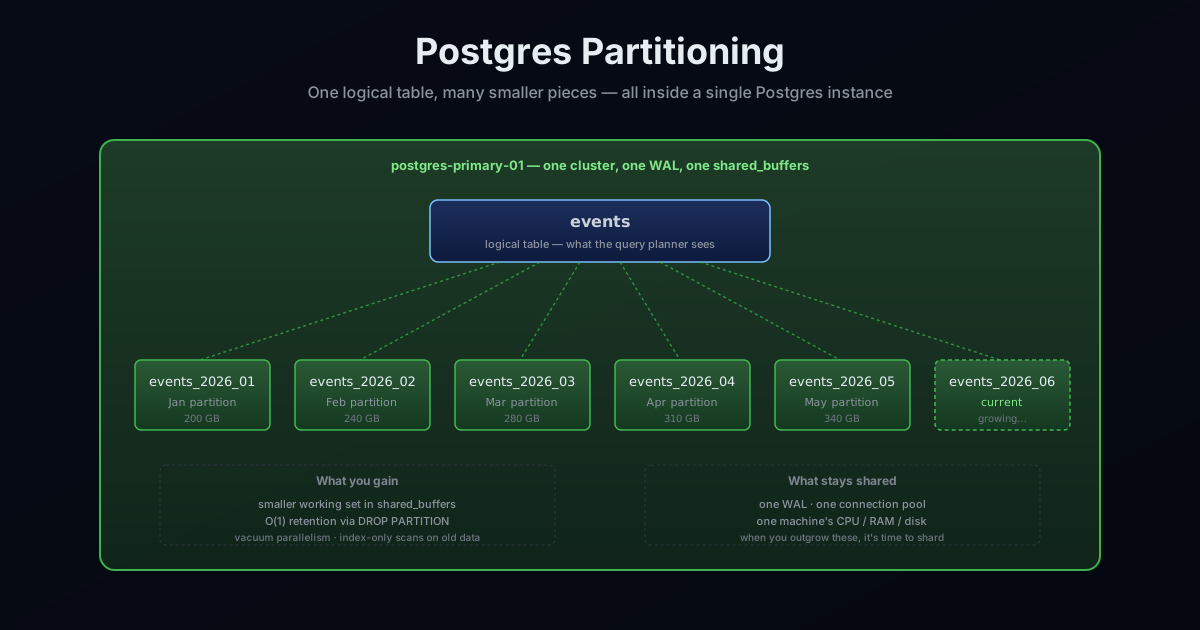
Partitioning is horizontal decomposition of one logical table into multiple physical tables that live in the same Postgres cluster. The planner treats the parent table as the query target; behind it, rows are routed to child tables (partitions) by a partition key. Same cluster, same Write-Ahead Log (WAL), same shared_buffers, same connection pool — none of the physical resources are duplicated. What changes is the size of the things the planner operates on.
Since Postgres 10, this is declarative partitioning — a first-class feature. The planner natively understands partition bounds, can prune (skip) partitions that can’t match a query, and can do partition-wise joins and aggregates with the right configuration.
A quick refresher on the two terms that show up repeatedly throughout this post. shared_buffers is Postgres’s in-memory cache for table and index pages, sized at startup (typically ~25% of system RAM) and never grows during runtime. Every read first checks shared_buffers; a miss falls through to the OS page cache and then to disk. autovacuum is the background process that reclaims space from dead row versions — the leftovers from every UPDATE and DELETE, which Postgres can’t free in place because of its MVCC (Multi-Version Concurrency Control) model. When autovacuum can’t keep up, tables bloat (grow on disk faster than their live row count would suggest) and query plans degrade.
2. The Three Partitioning Strategies
RANGE — each partition owns a contiguous range of values. The textbook case is time-series.
CREATE TABLE events (
    id          bigserial,
    user_id     bigint      NOT NULL,
    payload     jsonb,
    created_at  timestamptz NOT NULL
) PARTITION BY RANGE (created_at);

CREATE TABLE events_2026_01 PARTITION OF events
    FOR VALUES FROM ('2026-01-01') TO ('2026-02-01');

CREATE TABLE events_2026_02 PARTITION OF events
    FOR VALUES FROM ('2026-02-01') TO ('2026-03-01');
LIST — each partition owns an explicit set of discrete values. Useful for low-cardinality categorical dimensions: region, tenant tier, country.
CREATE TABLE customers (id bigserial, region text, ...)
    PARTITION BY LIST (region);

CREATE TABLE customers_us   PARTITION OF customers FOR VALUES IN ('us-east','us-west');
CREATE TABLE customers_eu   PARTITION OF customers FOR VALUES IN ('eu-west','eu-central');
CREATE TABLE customers_apac PARTITION OF customers FOR VALUES IN ('ap-south','ap-northeast');
HASH — Postgres hashes the key and assigns rows by hash(key) % N. Used when the goal is even distribution, not range pruning. Equality lookups on the key still prune to one partition (the planner computes the hash); queries without the key fan out to all partitions.
CREATE TABLE messages (id bigserial, channel_id bigint, body text, ...)
    PARTITION BY HASH (channel_id);

CREATE TABLE messages_p0 PARTITION OF messages FOR VALUES WITH (modulus 8, remainder 0);
-- ... through p7
You can also nest these — RANGE-by-time at the outer level with HASH-by-tenant within each month, for example. This is sub-partitioning, and it’s powerful but easy to overuse (more on that in the pitfalls section).
3. Partition Pruning — The Mechanism That Makes It Worth Anything
All three strategies do the same physical thing: split one logical table into smaller child tables. But splitting alone doesn’t make a single query faster — if Postgres scans every child table looking for matching rows, you’ve turned one big scan into many smaller scans and gained nothing. The strategies pay off only when the planner can skip the partitions that can’t contain matching rows for a given query. That skipping is called partition pruning, and it’s the connection between “I defined some partitions” and “my queries got faster.”
With twelve monthly partitions, a one-month query touches one partition, not all twelve. Pruning happens in two phases:
- Plan-time pruning inspects literal
WHEREpredicates and rules out partitions whose bounds can’t satisfy them. - Execution-time pruning kicks in when the partition key arrives at runtime — from a
JOIN, a parameterized statement, or a subquery. Look forSubplans Removed: NinEXPLAIN ANALYZE.
Pruning is fragile in exactly one way: it requires the column to appear plainly in the predicate. Wrapping it in a function defeats it.
-- ❌ no pruning — function on partition column blocks it
WHERE date_trunc('month', created_at) = '2026-02-01'

-- ✅ pruning works
WHERE created_at >= '2026-02-01' AND created_at < '2026-03-01'
The single most common partitioning bug: writing the query in the form that defeats pruning and not noticing because the result is still correct, just slow.
4. Local Indexes — and the Absence of Global Indexes
The single most Postgres-specific detail in the partitioning story, and it routinely surprises people coming from Oracle or SQL Server: Postgres has no global indexes. Every index on a partitioned table is implicitly local — it exists per-partition. CREATE INDEX ON events (user_id) creates that index on every partition individually, and the parent holds metadata tying them together as one “partitioned index.”
Consequences:
UNIQUEconstraints can only be enforced if the partition key is part of the uniqueness columns. A globally uniqueemailon a hash-partitioneduserstable isn’t possible without(email, partition_key)— usually not what you want.- Primary keys are enforced per-partition. A
bigserialidwon’t collide because the sequence is global, but the uniqueness check is local. - Queries without the partition key in the predicate still use per-partition indexes — but the planner scans them all in turn.
Workarounds exist (managed-uniqueness extensions, externally-issued IDs), but the right move is usually to design the schema so global uniqueness isn’t needed, or so the partition key is implicitly the prefix of the unique key.
5. The Real Advantages (with concrete examples)
This is where partitioning earns its place. The standard one-line summary — “it makes large tables manageable” — undersells it. Here’s what you actually get.
5.1 The active working set fits in shared_buffers
Postgres caches heap and index pages in shared_buffers. If the hot data plus its indexes are larger than the buffer pool, every random lookup is a cache miss and a disk read. Disk reads are roughly 1000× slower than buffer hits.
Concrete example. A 4 TB unpartitioned events table with a 600 GB primary-key B-tree on a 128 GB box. The B-tree alone is 5× the buffer pool, so every WHERE id = X query that doesn’t hit a recently-touched page is a cold disk read. Tail latency is dominated by these misses.
Partition the same table into 48 monthly partitions. A query filtering by created_at >= '2026-04-01' now touches a single ~12 GB partition with a ~12 GB B-tree. The active partition fits in the buffer pool comfortably. The query plan is identical — same scan, same join, same filter — but every page read is now a buffer hit instead of a disk miss. Latency drops by an order of magnitude.
Partitioning’s quiet superpower: it doesn’t make the data smaller, it makes the active working set smaller.
5.2 Retention becomes O(1)
Dropping a partition is a metadata operation. DROP TABLE events_2026_01 on a 200 GB partition takes milliseconds and immediately returns the storage to the OS.
Compare with the equivalent on an unpartitioned table: DELETE FROM events WHERE created_at < '2026-02-01' is a multi-hour scan that rewrites every page touched (Postgres marks deleted rows as dead tuples instead of removing them in place — the consequence of MVCC). After the DELETE finishes, you need autovacuum to reclaim those dead tuples, another multi-hour operation. And even after vacuum, the table’s physical size doesn’t shrink, because Postgres can’t return free space mid-file to the OS without VACUUM FULL, which takes an exclusive lock and blocks reads.
The retention story is the single biggest practical win of partitioning. Append-heavy tables — events, audit logs, activity streams, metrics — all have a natural retention horizon. Partition by time, drop old partitions on a cron, and the table never actually grows unboundedly.
5.3 Operational isolation for DDL
ALTER TABLE on a 4 TB unpartitioned table takes a heavy lock and blocks every other operation on that table. On 48 partitions, you can apply the same schema change one partition at a time, pace the rollout over hours or nights, and the live partitions keep serving queries.
Concrete example. Adding a column with a non-null default to an unpartitioned 4 TB table rewrites every row — hours of downtime. On 48 partitions, you can do it partition by partition over a few off-hours windows. New writes go to the partitions that already have the column; the migration completes lazily without ever blocking traffic for more than a few seconds per partition.
5.4 Autovacuum parallelism
Autovacuum runs a configurable number of workers (autovacuum_max_workers, default 3). Each worker handles one relation at a time. On one giant unpartitioned table, three workers can only contend for the same table — there’s nothing for the other two to do. On 48 partitions, three workers can be vacuuming three partitions concurrently. The total throughput of vacuum work is now bounded by your autovacuum_max_workers and per-worker cost limits, not by the size of one table.
Partitioning is the cheapest way to give autovacuum useful parallelism on a write-heavy workload.
5.5 Per-partition statistics, better query plans
Postgres maintains statistics per table — row counts, value distributions, distinct counts, most-common-values lists — that the planner uses to estimate query costs. On one giant table, these statistics are averages across the entire dataset. On a partitioned table, each partition has its own statistics tuned to that partition’s actual data.
Example. The events table has old, stable partitions (Jan–Feb) and a current churning partition (live data). The query distributions are very different — the live partition has more recent timestamps clustered tightly, while older partitions are evenly distributed. Per-partition stats let the planner pick a different (better) plan for each range. On one giant table, the stats are blurred together and the planner makes one mediocre estimate for everything.
5.6 Index-only scans for old data
Every heap page has a corresponding bit in Postgres’s visibility map — a compact structure that tracks whether all rows on the page are visible to every active transaction. When an index scan touches a page marked all-visible, Postgres can skip the heap fetch entirely and return data directly from the index entries. This is an index-only scan — the fastest possible read path.
For a page to be marked all-visible, it must have had no recent modifications and autovacuum must have run since. On a churning unpartitioned table, most pages are never marked all-visible for long because writes keep touching them. On a partitioned table, old read-mostly partitions stabilize at all-visible permanently. Queries against historical data become index-only scans automatically — Heap Fetches: 0 in EXPLAIN ANALYZE, which is the fastest read path Postgres has.
5.7 Tiered storage via tablespaces
Postgres lets you create tablespaces — named locations on disk — and assign tables to them. Partitions can live in different tablespaces:
CREATE TABLESPACE cold_storage LOCATION '/mnt/slow_ssd';

ALTER TABLE events_2024_01 SET TABLESPACE cold_storage;
ALTER TABLE events_2024_02 SET TABLESPACE cold_storage;
Old, rarely-accessed partitions move to slower (cheaper) storage — slower SSD, spinning rust, even network-attached storage. Hot partitions stay on fast local NVMe. The table is still one logical thing; queries against current data are fast, queries against historical data are slower but possible.
This is the same pattern that data warehouses use natively. Partitioning gives it to you in operational Postgres without leaving the database.
5.8 CREATE INDEX CONCURRENTLY scales linearly
Building an index on a large table normally takes an exclusive lock. CREATE INDEX CONCURRENTLY avoids that but does two passes over the table and is several times slower than the locking variant. On a 4 TB unpartitioned table, a concurrent build can take a day.
On 48 partitions, you can build the index on each partition independently, in parallel if you want, and each build is a fraction of the size. The total wall-clock time can be hours instead of days — and if a build fails on one partition, you’ve only lost one partition’s worth of work, not the entire index.
5.9 Capacity planning is visible
A single 4 TB table that’s growing… how fast? You can plot the size over time, but the past-versus-current rate is mushed together.
With monthly partitions, each partition’s size is a clear data point. events_2026_01 is 180 GB; events_2026_02 is 230 GB; events_2026_03 is 290 GB. Now you have a growth curve, per period, that’s trivial to query (SELECT pg_relation_size('events_2026_03')). Capacity planning is a SQL query away.
5.10 Selective backups and archival
pg_dump on a partitioned table can target specific partitions: pg_dump -t events_2024_* dumps only old partitions, perhaps for archival to S3 as Parquet files. You don’t need to dump the whole table to back up the inactive parts.
Many teams build a pipeline: monthly cron job archives the about-to-be-dropped partition to S3 as Parquet, dumps a SQL backup as a sanity copy, then drops the partition. Storage costs go down by an order of magnitude; reads against archived data are still possible (just slower, via S3 Select or a query engine like DuckDB or Athena).
5.11 Lock contention is localized
A long-running VACUUM FULL or REINDEX on one partition does not block queries on the other partitions. A locking schema change on events_2024_01 doesn’t stop the application from inserting into events_2026_05. Operational events that used to take down “the events table” now take down “one slice of the events table” — much smaller blast radius.
6. Internals: What Postgres Does Differently With Partitioned Tables
Behind these advantages are real changes to how Postgres processes queries.
Query planner cost
Planning time grows with the number of partitions. With 12 partitions and good pruning, planning overhead is negligible. With 5,000 partitions and a query that can’t prune, the planner can spend more time deciding than the executor spends running. Postgres 12+ improved per-partition planning cost dramatically (from milliseconds to microseconds), but the rule still holds: prefer hundreds of partitions over thousands. The sweet spot is usually 30–500 partitions per table.
Partition-wise joins and aggregates
Set enable_partitionwise_join = on and enable_partitionwise_aggregate = on (both off by default because they increase planning time) and the planner can join matching partitions of two co-partitioned tables in parallel, and aggregate per-partition before combining. For analytical workloads on partitioned fact tables, this can be the difference between a 30-second query and a 2-second one.
MVCC, dead tuples, and xid wraparound
MVCC keeps multiple versions of each row visible to different transactions. Every UPDATE writes a new tuple; the old becomes dead, waiting for vacuum. On a 4 TB unpartitioned table with high churn, the dead-tuple bookkeeping is one giant problem; on 48 partitions it’s 48 smaller problems autovacuum workers handle in parallel.
Postgres’s transaction IDs are 32-bit, and VACUUM FREEZE exists to mark old tuples visible to all future transactions so their xids can be safely reused. On a giant unpartitioned table, freezing is a recurring multi-hour I/O storm. On partitions, freezing is incremental — old read-mostly partitions get frozen once and then never need it again.
What partitioning shares (and doesn’t multiply)
It’s worth being explicit about what partitioning does not duplicate, because that’s what determines whether you need to go further:
- One WAL. Every insert across every partition writes to the same Write-Ahead Log. Partitioning doesn’t add write throughput beyond what one machine’s WAL can sustain.
- One
shared_buffers. All partitions compete for the same buffer pool. - One
max_connections. Same connection pool, same pgbouncer, same backend processes. - One replication stream. Logical or physical, the WAL is one stream that one replica replays.
- One CPU pool. Partition-wise parallelism helps, but you’re still bounded by the machine’s cores.
Hit any of these ceilings and you’ve left the world of partitioning. That’s the next post in the Distributed Systems series.
7. Pitfalls and Things to Watch For
The advantages above are real, but they assume you set things up correctly. Here’s the failure-mode catalogue.
7.1 Wrong partition key
You hash-partitioned messages by id, but every query filters by channel_id. Every query now touches every partition (no pruning is possible without the key in the predicate), planning time is several times slower than the unpartitioned baseline, and you’ve made things worse.
The fix is a full re-partition — a migration on the same scale as a shard rebalance: double-write to the new partitioning scheme, backfill, verify, cut over. Pick the key like it’s permanent, because in practice it is.
A useful rule: look at the top 20 queries against the table. The column that appears in 90%+ of WHERE clauses is your partition key candidate. If no single column dominates, partitioning by any of them is going to hurt the queries that filter on the others.
7.2 Partition explosion
The daily-partition cron got stuck after a server move; 90 days of rows are stacked in events_default (the catchall partition for rows that don’t match any defined partition). The planner now has to consider hundreds of partition bounds for every query, and the catchall partition has no useful indexes for the workload.
Worse: someone set up sub-partitioning by tenant inside RANGE-by-time, without bounding the tenant count. You now have 200,000 partitions, query planning takes 30 seconds, and autovacuum is permanently rotating through them.
Watch the partition count actively. A monitoring alert at “more than 1,000 partitions on any single relation” catches this class of bug before it becomes an outage.
7.3 The default partition is a trap
CREATE TABLE events_default PARTITION OF events DEFAULT;The default partition catches rows that don’t match any explicitly-bounded partition. It seems like a safety net, but in practice:
- It hides bugs. Your cron didn’t create April’s partition? Rows accumulate in
events_defaultinstead of failing loudly. You notice when queries get slow weeks later. - It defeats pruning for every query. As long as
events_defaultexists, the planner can’t be certain a query doesn’t need to scan it, so it scans it for every query. - Removing it later requires moving the rows out — and you can’t add a new bounded partition that overlaps with rows already in the default.
The pattern most teams converge on: don’t create a default partition. Let inserts fail when partitions are missing. The failure is loud, immediate, and trivially fixable; the alternative is silent rot.
7.4 Sub-partitioning is rarely worth it
The temptation: range-partition by month, then hash-partition each month by tenant. Two levels of pruning, smaller chunks. In practice:
- The partition count multiplies (12 months × 32 tenants = 384 partitions).
- Operational complexity multiplies (creating new top-level partitions now creates 32 sub-partitions).
- The pruning benefit is marginal unless both keys are routinely in the query predicate.
If a single level of partitioning has gotten you to chunks of reasonable size (1–50 GB per partition), don’t sub-partition. The exception is genuinely two-dimensional workloads — usually time + tenant — where queries always filter by both.
7.5 ATTACH and DETACH partition locks
ATTACH PARTITION briefly takes an ACCESS EXCLUSIVE lock on the parent table — usually fast but it blocks every read in the meantime. DETACH PARTITION historically did the same; Postgres 14+ added DETACH PARTITION ... CONCURRENTLY which avoids the heavy lock but takes longer (two phases, validation step in between).
If you’re on PG 14+, always use CONCURRENTLY for detaches. If you’re on an older version, schedule attach/detach operations during low-traffic windows.
7.6 Foreign keys to a partitioned table
Foreign keys on a partitioned table (the partitioned table has the FK) work fine. Foreign keys to a partitioned table (something else FKs into it) were only added in Postgres 12, and even then have some restrictions — for example, the referenced columns must include the partition key.
If you’re targeting cross-version compatibility or you’re on PG 11 or earlier, design around this. A common pattern: store the FK reference but don’t declare it; enforce in application code.
7.7 Hash partitioning hides scatter-gather
Queries that supply the hash partition key prune to one partition. Queries that don’t supply the key — analytics, joins on a different column, full scans — run on every partition. Eight partitions = eight sequential scans, eight index scans, eight result merges.
This is fine for occasional queries. It’s catastrophic if it’s most of your workload. Always check EXPLAIN ANALYZE for Append (Subplans Removed: N) — if N = 0 regularly, you’re hash-partitioning data without using the key, and the partitioning is hurting you.
7.8 Function-on-column defeats pruning
The single most common partitioning bug. The partition key column has to appear plainly in the WHERE clause for the planner to use the partition bounds.
-- ❌ no pruning, scans every partition
WHERE date_trunc('month', created_at) = '2026-02-01'
WHERE created_at::date = '2026-02-15'

-- ✅ pruning works
WHERE created_at >= '2026-02-01' AND created_at < '2026-03-01'
WHERE created_at >= '2026-02-15' AND created_at < '2026-02-16'
Build a habit of writing predicates against the raw column, and use EXPLAIN ANALYZE to verify partitions are being skipped on any new query against a partitioned table.
7.9 Execution-time pruning is fragile
Plan-time pruning handles literal predicates. Execution-time pruning handles values that arrive at runtime (a parameterized query, a JOIN key, a subquery result). It works — sometimes. Some query shapes never trigger runtime pruning even when the values are clearly available. The query then scans every partition with the per-partition index, which is less efficient than the unpartitioned baseline.
Look for Subplans Removed: N in EXPLAIN ANALYZE. If N = 0 for a query where the partition key is determined at runtime, you’ve hit a planner limitation. Workarounds include rewriting as a CTE that fixes the value first, or splitting into two queries.
7.10 Sequences and uniqueness
bigserial columns work fine across partitions — the sequence is global to the cluster, so IDs don’t collide. But: the uniqueness check is local to each partition. If you somehow inserted a row with id = 42 on events_2026_01 and id = 42 on events_2026_02, Postgres would not catch it, because the unique index that enforces the PK only exists per-partition.
In practice this is fine — bigserial never reuses values — but it’s worth knowing. If you have any path that allows specifying the id directly (a backfill, a restore, an INSERT ... SELECT), you can produce duplicate IDs across partitions and not get an error.
7.11 Statistics aren’t always up to date
ANALYZE collects statistics. On a partitioned table, you can analyze the parent (which combines stats from all partitions) or the individual partitions. The default autovacuum_analyze_* thresholds are evaluated per-partition, which is good — but the parent table’s stats only update when you analyze it explicitly.
If you run queries that aggregate across partitions, the planner uses parent-level stats. Schedule a periodic ANALYZE events on the parent — once a day is usually fine.
7.12 Forgetting to create future partitions
You partition by month. You manually create partitions through December. December rolls around. January arrives. Inserts to January start failing because no partition covers 2027-01-01.
Either use pg_partman to create partitions automatically on a schedule, or wire up your own cron job that creates the next several months ahead. Set up an alert that fires when the latest partition’s upper bound is less than 30 days in the future.
7.13 EXPLAIN output is much larger
EXPLAIN ANALYZE on a partitioned table with 48 partitions and no pruning produces a plan with 48 Seq Scan or Index Scan nodes — pages of output to scroll through. This is normal but disorienting at first. Get used to looking for Append (Subplans Removed: N) at the top and reading the surviving sub-plans.
7.14 Version dependencies
Partitioning capabilities have evolved fast. A short table:
- PG 10 — declarative partitioning introduced, RANGE and LIST only.
- PG 11 — HASH partitioning, FK to partitioned tables, partition-wise joins (off by default).
- PG 12 — partition pruning improvements, FK to partitioned tables fully supported.
- PG 13 — logical replication for partitioned tables.
- PG 14 —
DETACH PARTITION ... CONCURRENTLY, partition-wise stats improvements. - PG 15 —
MERGEworks on partitioned tables.
If you’re on an older version, some of the advantages above don’t apply yet. Check your PG version before promising any specific behaviour.
7.15 pg_dump dumps each partition separately
pg_dump of a partitioned table emits separate CREATE TABLE and COPY statements per partition. Restore order matters: parents before children, or use --section=pre-data and --section=data separately. Most of the time this Just Works, but it can surprise teams running custom backup/restore scripts.
8. The Ecosystem
Two tools come up everywhere in production.
pg_partman — the de-facto partition-management extension. Creates partitions ahead of time, drops old ones, optionally indexes new ones. If you’re range-partitioning by time, you almost certainly want pg_partman. The alternative is a homegrown cron job that gets the timezone wrong on a Sunday at 3 AM.
TimescaleDB — a Postgres extension purpose-built for time-series. Hypertables auto-partition by time (and optionally by space); also gives you continuous aggregates, compression, retention policies, and time-bucket query helpers. For unambiguously time-series workloads (metrics, IoT sensor data, financial ticks), it beats hand-rolled partitioning on ergonomics. For mixed OLTP (transactional workloads like e-commerce or SaaS apps) where time is one dimension among many, plain partitioning + pg_partman is usually better.
9. When Partitioning Isn’t Enough
Partitioning solves problems about size per relation. The dataset is bigger than any single relation can comfortably hold; partitioning splits it into chunks that the planner, the buffer pool, autovacuum, and operational tooling can all handle.
It does not solve problems about per-cluster physical resources. When you’ve maxed out:
- One machine’s CPU cores
- One machine’s RAM
- One disk’s IOPS
- One WAL’s write throughput
- One replication stream’s apply rate
- One
max_connectionsceiling
…partitioning won’t help. Every partition still shares those resources. That’s when you start thinking about sharding — splitting the dataset across multiple Postgres instances. Sharding is a completely different category of operation, with its own architectural questions and its own catalogue of failure modes. It’s covered in the next post in this series’ sibling: Sharding Postgres, the first post in the Distributed Systems series.
The honest framing: most teams who think they need sharding actually need partitioning, more RAM, better query plans, or a vertical decomposition of their database (splitting billing, analytics, notifications into their own Postgres instances). Real horizontal sharding is for the small number of systems that genuinely outgrow one machine in write throughput or total data size — and even then, often after a year or two of partitioning and vertical decomposition have bought them runway.
10. The Takeaway
The single highest-leverage operation a Postgres team can perform on a large table is range-partitioning by time, if the workload has any natural retention horizon. The benefits compound: smaller working set, cheaper retention, autovacuum parallelism, index-only scans on old data, operational isolation. The cost — partition creation cron jobs, slightly more complex EXPLAIN output, a few rules to follow when writing queries — is a small fraction of what you get back.
The pitfalls above are real, but they’re all knowable up front. Pick the partition key like it’s permanent, don’t create a default partition, watch the partition count, and write your WHERE clauses without functions on the partition column. Get those right and partitioning is one of the few Postgres features where the upside is huge and the downside is small.
The architecture that survives is the one you can still understand at 3 AM with a single psql window open. Partitioning keeps you in that world for much longer than people expect.
Related reading
- How Databases Actually Store and Find Your Data — pages, heaps, and TIDs that partitioning splits at the physical level.
- PostgreSQL Indexing Deep Dive — local indexes per partition, and how partition pruning interacts with index choice.
- Reading PostgreSQL EXPLAIN Output — recognising
Append,Subplans Removed, and partition-wise joins in real plans. - Sharding Postgres: When One Database Stops Being Enough — the next step when partitioning isn’t enough.
- Database Replication: What to Use When — how partitions interact with WAL streaming and logical replication.