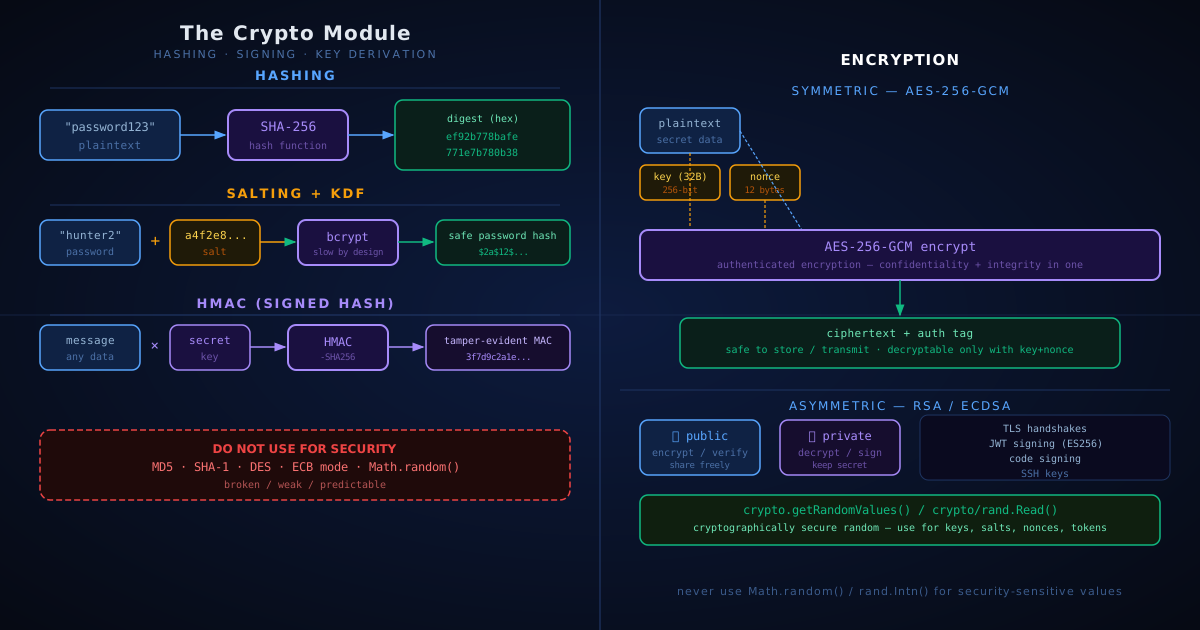
The Crypto Module: Hashing, Encryption, and What to Use When
Every serious programming language ships a crypto module in its standard library. Go has crypto/*. Node.js has node:crypto. Python has hashlib and secrets. They all expose the same underlying primitives — but using the wrong one for the job can silently destroy your security.
This post maps the terminology to the concepts, shows you what each primitive actually does, and gives you a clear decision tree for common scenarios.
The Vocabulary (Defined Once, Used Everywhere)
Before touching code, let’s fix the words. A lot of crypto confusion comes from these terms being used interchangeably when they shouldn’t be.
Encoding — transforms data into a different representation. Base64, hex, URL-encoding. Reversible. Provides zero security — it’s not encryption.
Hashing — a one-way transformation. Input of any size → fixed-size output (the digest). Practically impossible to reverse. The same input always produces the same digest.
Encryption — a two-way transformation. Requires a key. You can decrypt back to the original if you have the key.
Digest — the output of a hash function. SHA-256("hello") → a 32-byte digest, usually shown as 64 hex characters.
Salt — random data mixed with a password before hashing it, so identical passwords produce different digests. Defeats precomputed rainbow-table attacks.
HMAC — Hash-based Message Authentication Code. A hash that requires a secret key to produce and verify. Proves both integrity and authenticity.
Key Derivation Function (KDF) — a deliberately slow hash designed specifically for passwords. Bcrypt, Argon2, PBKDF2 are KDFs. Slowness is the feature — it makes brute-force expensive.
Pepper — a server-side secret (e.g. in an environment variable) mixed into every password hash. Stored separately from the database, so a DB leak alone isn’t enough to crack hashes.
IV / Nonce — Initialisation Vector / Number Used Once. Random bytes fed into an encryption operation so that encrypting the same plaintext twice produces different ciphertexts.
Hashing: Integrity, Not Secrecy
Use a hash when you need to verify that data hasn’t changed, or to produce a fixed-size fingerprint of something.
What it’s good for:
- Checksums on file downloads
- Deduplication (content-addressable storage)
- Building blocks for HMAC and KDFs
What it is NOT for: storing passwords, or anything where the data needs to be kept secret.
// Go
import (
    "crypto/sha256"
    "fmt"
)

data := []byte("important document")
digest := sha256.Sum256(data)
fmt.Printf("%x\n", digest) // 64 hex chars
// Node.js
import { createHash } from 'node:crypto';
const digest = createHash('sha256')
.update('important document')
.digest('hex');
console.log(digest); // 64 hex charsWhich algorithm to use:
| Algorithm | Status | Use for |
|---|---|---|
| SHA-256 | ✅ Safe | General-purpose checksums, HMAC, signatures |
| SHA-512 | ✅ Safe | Same as SHA-256, larger output |
| SHA-3 | ✅ Safe | Rarely needed; useful when SHA-2 is disallowed by policy |
| MD5 | ❌ Broken | Nothing security-related. Legacy file checksums only |
| SHA-1 | ❌ Broken | Nothing security-related |
MD5 and SHA-1 are collision-vulnerable — two different inputs can produce the same digest. Never use them where security matters. Legacy systems still use them for non-security checksums (git uses SHA-1 for object IDs, for instance), but that doesn’t make them acceptable for new code dealing with passwords or signatures.
Practical example: package and image integrity. When you npm install, npm verifies every downloaded tarball against a SHA-256 hash recorded in package-lock.json. If a byte differs — because the file was corrupted mid-download or because a malicious registry served a swapped tarball — the install fails before any code runs. The same pattern is everywhere: Docker pulls verify the sha256:abc123… digest of each image layer, apt checks SHA-256 sums in its Packages.gz index, and download pages publish hashes so you can run sha256sum file.iso locally and compare. The hash isn’t secret; it’s a public fingerprint that lets anyone detect tampering.
Salting and Password Hashing
The single most common crypto mistake engineers make: hashing a password with SHA-256 directly.
// ❌ WRONG — never do this
hash := sha256.Sum256([]byte("mypassword"))
The problem: SHA-256("password123") is the same hash for every user with that password. An attacker with a precomputed table of common password hashes (a rainbow table) can reverse millions of hashes instantly.
The fix: use a purpose-built key derivation function (KDF).
A salt is a random value mixed with the password before hashing, so identical passwords produce different digests.
A KDF is a hash function deliberately designed to be slow — it makes brute-force attacks expensive. Good KDFs (bcrypt, Argon2id) generate and manage the salt for you automatically; you don’t store the salt separately.
// Go — bcrypt handles salt generation internally
import "golang.org/x/crypto/bcrypt"

// when user signs up:
hash, err := bcrypt.GenerateFromPassword([]byte("mypassword"), bcrypt.DefaultCost)

// when user logs in:
err = bcrypt.CompareHashAndPassword(hash, []byte("mypassword"))
if err == nil {
    // password matches
}
// Node.js — use the bcryptjs or @node-rs/bcrypt package
import bcrypt from 'bcryptjs';
// signup
const hash = await bcrypt.hash('mypassword', 12); // 12 = cost factor
// login
const ok = await bcrypt.compare('mypassword', hash);The output looks like $2a$12$xyz... — the format embeds the algorithm, cost factor, salt, and hash all together. You store this single string and never need to manage the salt separately.
What is the cost factor?
The cost factor (sometimes called work factor) controls how slow the KDF is. It’s not a linear multiplier — in bcrypt it’s an exponent: cost 12 means 2¹² = 4,096 internal iterations; cost 13 means 8,192. Each increment roughly doubles the time.
cost 10 → ~80ms   per hash  (too fast for high-security systems today)
cost 12 → ~300ms  per hash  (good default)
cost 13 → ~600ms  per hash
cost 14 → ~1200ms per hash
The right cost factor is the highest one your system can afford without making login feel sluggish. A rule of thumb: aim for 200–500ms on your production hardware, and recalibrate every few years as hardware gets faster.
For PBKDF2 (Password-Based Key Derivation Function 2), the equivalent knob is the iteration count — the same principle applies: more iterations = more time = harder to brute-force.
For Argon2id, you tune time cost (iterations), memory cost (RAM), and parallelism. OWASP recommends a starting point of m=64MB, t=1, p=1 and increasing memory until you hit your latency budget.
KDF comparison:
| KDF | Recommended cost | Memory-hard? | Notes |
|---|---|---|---|
| Argon2id | default params | ✅ Yes | Best choice for new systems |
| bcrypt | cost ≥ 12 | No | Widely supported, still fine |
| PBKDF2-SHA256 | ≥ 600,000 iterations | No | FIPS-compliant environments |
| SHA-256 alone | — | — | ❌ Never for passwords |
Memory-hard means the algorithm requires a lot of RAM, not just CPU time. This makes GPU-based brute-force attacks much more expensive — a GPU can run millions of SHA-256 operations per second in parallel, but struggles when each operation needs gigabytes of memory.
Bcrypt gotcha: bcrypt silently truncates passwords longer than 72 bytes. A user with a 100-character passphrase only gets the first 72 hashed. If you allow long passwords, either pre-hash with SHA-256 before passing to bcrypt, or use Argon2id which has no length limit.
When NOT to salt
Salt is valuable for low-entropy inputs like passwords where precomputed tables are a realistic attack. Skip it when:
- Input is already high-entropy — API keys, UUIDs, cryptographic tokens (128-bit random values). Precomputing 2¹²⁸ hashes is impossible; salt adds nothing.
- File integrity checksums —
SHA-256of a file download exists to be verified against a published hash. A salt would change the digest and break the comparison. - Content-addressable storage / deduplication — git object IDs, IPFS CIDs. The entire point is that identical content produces identical hashes. Salt breaks this by design.
- HMAC — the secret key already plays the role of salt (and provides authentication on top). A separate salt is redundant.
- Deterministic lookup — if you need to query “does this value exist?” against stored hashes (e.g. checking whether an email is already registered), per-record salts prevent direct comparison. You’d need a server-side secret applied consistently to all records (a pepper) rather than a random per-record salt.
The one-line rule: salt when the input space is small enough for an attacker to precompute hashes for; skip salt when the input is already unpredictable, or when identical-input → identical-hash is a requirement.
HMAC: Signed Hashes
A plain hash proves the content hasn’t been corrupted. But it doesn’t prove who produced it. An attacker who intercepts a payload can recompute the hash after modifying the data.
HMAC adds a secret key to the mix. Only someone who knows the key can produce or verify the MAC (Message Authentication Code).
Both sides share the secret key. The sender signs, the receiver re-signs the same message and compares.
// Go
import (
    "crypto/hmac"
    "crypto/sha256"
    "encoding/hex"
)

var sharedKey = []byte("my-secret-key")

// SENDER: sign and transmit (message, signature)
func sign(message []byte) string {
    mac := hmac.New(sha256.New, sharedKey)
    mac.Write(message)
    return hex.EncodeToString(mac.Sum(nil))
}

// RECEIVER: recompute and compare in constant time
func verify(message []byte, receivedSig string) bool {
    mac := hmac.New(sha256.New, sharedKey)
    mac.Write(message)
    expected := mac.Sum(nil)

    actual, err := hex.DecodeString(receivedSig)
    if err != nil {
        return false
    }
    return hmac.Equal(expected, actual) // constant-time
}
// Node.js
import { createHmac, timingSafeEqual } from 'node:crypto';
const SECRET = 'my-secret-key';
function sign(message) {
return createHmac('sha256', SECRET).update(message).digest('hex');
}
function verify(message, receivedSig) {
const expected = createHmac('sha256', SECRET).update(message).digest();
const actual = Buffer.from(receivedSig, 'hex');
if (actual.length !== expected.length) return false;
return timingSafeEqual(expected, actual);
}Use HMAC for:
- API request signing (webhook signatures from Stripe, GitHub, etc.)
- JWT (JSON Web Token) secrets — the
HS256algorithm is HMAC-SHA256 - Signed cookies or session tokens
Practical example: verifying a Stripe webhook. When a payment succeeds, Stripe POSTs a JSON event to your endpoint and includes a Stripe-Signature HTTP header containing an HMAC-SHA256 of the raw request body, computed with a webhook secret that you and Stripe both hold. Your handler reads the secret from your environment, recomputes the HMAC over the exact bytes of the request body, and compares it to the header value using a constant-time check. If they match, you know two things: the request actually came from Stripe (nobody else has the secret), and the body wasn’t altered in transit. Without this verification, anyone who learns your webhook URL could send fake payment.succeeded events and trick your app into shipping products for free.
Why constant-time comparison matters
When you compare two strings with ===, most implementations short-circuit — they stop at the first byte that differs and return false immediately. This creates a tiny but measurable timing difference: a signature that matches the first 20 bytes takes slightly longer to reject than one that matches 0 bytes.
An attacker who can send millions of requests and measure response times can exploit this. They try signatures that differ one byte at a time, watching for the requests that take slightly longer. Eventually they can reconstruct the correct signature one byte at a time — without ever knowing the secret key. This is called a timing attack.
hmac.Equal in Go and timingSafeEqual in Node always take the same amount of time regardless of how many bytes match. The comparison never short-circuits. That removes the timing signal entirely.
When NOT to use HMAC
- For data integrity alone over HTTPS, between services you control — if you’re calling your own internal service over TLS (Transport Layer Security, the protocol behind HTTPS), the TLS layer already provides integrity. Adding HMAC is redundant. (But for webhooks like Stripe → your endpoint, HMAC is still needed — HTTPS only proves the data wasn’t tampered with in transit, not that the sender is Stripe specifically.)
- When the other party doesn’t share your key — HMAC requires both sides to know the secret. If you need to prove identity to a third party who doesn’t have your key (e.g. a public API client), use asymmetric signatures (RS256, ES256) instead.
- For password storage — HMAC is not a key derivation function. Don’t use it to hash passwords; use bcrypt or Argon2id.
Encryption: AES-256-GCM
When you need to encrypt data and decrypt it later (unlike hashing, which is one-way), use AES-256-GCM. This is the current industry standard for symmetric encryption.
- AES-256: Advanced Encryption Standard with a 256-bit key. Extremely fast on modern hardware (dedicated AES instructions exist in every modern CPU).
- GCM mode: Galois/Counter Mode. It gives you both confidentiality (nobody can read the data) and integrity (nobody can tamper with it without detection). This combination is called AEAD (Authenticated Encryption with Associated Data) — “Associated Data” is optional unencrypted metadata, like a record ID, that you want authenticated alongside the ciphertext but not hidden.
// Go
import (
    "crypto/aes"
    "crypto/cipher"
    "crypto/rand"
    "io"
)

func encrypt(key, plaintext []byte) ([]byte, error) {
    block, _ := aes.NewCipher(key)
    gcm, _ := cipher.NewGCM(block)

    nonce := make([]byte, gcm.NonceSize()) // 12 bytes
    io.ReadFull(rand.Reader, nonce)        // cryptographically random

    // nonce is prepended to ciphertext so decryption can extract it
    return gcm.Seal(nonce, nonce, plaintext, nil), nil
}

func decrypt(key, ciphertext []byte) ([]byte, error) {
    block, _ := aes.NewCipher(key)
    gcm, _ := cipher.NewGCM(block)

    nonce := ciphertext[:gcm.NonceSize()]
    data  := ciphertext[gcm.NonceSize():]
    return gcm.Open(nil, nonce, data, nil)
}
// Node.js
import { randomBytes, createCipheriv, createDecipheriv } from 'node:crypto';
function encrypt(key, plaintext) {
const nonce = randomBytes(12);
const cipher = createCipheriv('aes-256-gcm', key, nonce);
const encrypted = Buffer.concat([cipher.update(plaintext), cipher.final()]);
const tag = cipher.getAuthTag(); // 16-byte auth tag
return Buffer.concat([nonce, tag, encrypted]);
}
function decrypt(key, data) {
const nonce = data.subarray(0, 12);
const tag = data.subarray(12, 28);
const ciphertext = data.subarray(28);
const decipher = createDecipheriv('aes-256-gcm', key, nonce);
decipher.setAuthTag(tag);
return Buffer.concat([decipher.update(ciphertext), decipher.final()]);
}What is a nonce?
A nonce (Number Used Once) is a random value you generate fresh for every single encryption. Think of it like a unique order number on an invoice — every invoice gets a different number, even if the contents are identical.
AES-GCM uses a 12-byte (96-bit) nonce. It is not secret — the decryptor needs it to decrypt, so it’s stored alongside the ciphertext. The only requirement is that it must be unique per encryption with a given key. That’s why you generate it with a CSPRNG rather than counting up from 0 (a counter can work but is error-prone to manage).
What happens if you reuse a nonce?
AES-GCM works by generating a keystream from the key and nonce, then XOR-ing your plaintext with it. If you encrypt two different messages with the same key and nonce, an attacker can XOR the two ciphertexts together — the keystream cancels out and they’re left with the XOR of the two plaintexts. Recovering readable content from that is often straightforward. Worse, the authentication tag (see below) becomes forgeable. This is called a two-time pad attack and it’s completely catastrophic.
The fix is trivial: always call randomBytes(12) or rand.Reader fresh for each encryption. Don’t save and reuse a nonce from a previous session.
What is the auth tag?
GCM produces a 16-byte authentication tag alongside the ciphertext. It’s a signature over the ciphertext, computed using the key and nonce. When you decrypt, GCM recomputes the tag and compares it to the stored one. If any byte of the ciphertext was modified — by an attacker, by corruption, by anything — the tags won’t match and decryption fails with an error.
This is why AES-GCM gives you both confidentiality and integrity in one operation. You don’t need a separate HMAC on top of an AES-GCM ciphertext.
Rules:
- Generate a new random nonce for every encryption. Reusing a nonce with the same key in GCM mode is catastrophic — it breaks both confidentiality and integrity.
- Never use ECB mode. ECB (Electronic Code Book) encrypts each 16-byte block independently, so identical blocks produce identical ciphertext. It famously leaks patterns in data (look up the “ECB penguin” to see why this matters).
- Key size: AES-128 (16 bytes) is still considered secure, but AES-256 (32 bytes) is the standard recommendation. Generate keys with a CSPRNG (see below), never derive them from a password with SHA-256.
Practical example: encrypting sensitive fields in a database. Say your app stores health records and the diagnosis column must be encrypted at rest so that even a stolen database dump leaks nothing useful. On write, you generate a fresh 12-byte nonce with randomBytes(12), encrypt the plaintext diagnosis with aes-256-gcm using your data key, and store nonce || auth_tag || ciphertext together as a single blob in the column. On read, you split the blob back apart and call decipher.setAuthTag(tag) before decrypting — if anyone has flipped a single byte in the ciphertext (or tried to swap one patient’s record into another), decipher.final() throws and you reject the read. The encryption key itself lives in your KMS, not in the database, so leaking the database alone is useless to the attacker.
Where Do Encryption Keys Live?
Encryption is only as strong as the secrecy of the key. The most common real-world failure isn’t broken crypto — it’s a key checked into a git repo or hardcoded in source code.
- Never commit keys to source code,
.envfiles in the repo, or container images. - Development: environment variables loaded from a local
.envthat’s git-ignored. - Production: a dedicated secrets manager or Key Management Service (KMS) — AWS KMS, GCP Cloud KMS, Azure Key Vault, HashiCorp Vault, Doppler. These services hold the key, enforce access control, and log every use. Your application asks the KMS to encrypt or decrypt on its behalf; the raw key material never lives in your application memory.
Rotating Keys
Key rotation means replacing an old key with a new one periodically or immediately after a suspected leak. The goal: if a key is ever exposed, the window of damage is bounded.
The challenge: data encrypted with the old key can’t be decrypted with the new one. The solution is to version your keys and tag your ciphertext with which version encrypted it:
# store with a version prefix
v1:3f8a12...:aabbcc...   ← encrypted with key version 1
v2:9d1f44...:112233...   ← encrypted with key version 2
During a rotation:
- Generate key v2. Start encrypting all new data with it.
- On reads, check the version prefix and decrypt with the matching key.
- Lazily re-encrypt old records as they’re accessed — write them back encrypted with v2.
- Once no v1-tagged records remain, retire key v1.
Nonces don’t rotate. A nonce is generated fresh for every single encryption operation and stored alongside that one ciphertext forever. You never reuse or “update” a nonce. If you’re thinking about nonce management — don’t. Just always call randomBytes(12) and you’re done.
Envelope Encryption
If you encrypted all your records directly with a single master key, rotating that key would mean re-encrypting every record through KMS — slow, expensive, and risky at scale.
Envelope encryption solves this with two layers:
Master Key  ← lives in KMS, you never see the raw bytes
     ↓  encrypts
 Data Key   ← one per record (or batch), stored alongside the ciphertext
     ↓  encrypts
 Your data
The workflow:
- Ask KMS to generate a data key. KMS returns two things: the plaintext data key, and an encrypted copy of it (the “wrapped key”).
- Encrypt your data locally with the plaintext data key using AES-256-GCM (fast, no KMS call per byte).
- Discard the plaintext data key from memory immediately.
- Store the wrapped key + nonce + ciphertext together.
To decrypt:
- Send the wrapped key to KMS. KMS decrypts it with the master key and returns the plaintext data key.
- Decrypt your data locally.
- Discard the plaintext data key again.
Why this is better than encrypting everything with one key:
- The master key never leaves KMS, so it’s never exposed in your app’s memory.
- To rotate the master key, you only re-wrap the small data keys — not the entire dataset. Re-keying a billion records is a billion tiny KMS calls on kilobyte-sized keys, not re-encrypting terabytes of data.
- Different records can have different data keys, so a single compromised key doesn’t expose everything.
AWS S3 server-side encryption, Google Cloud Storage, and most database encryption-at-rest systems all use this pattern under the hood.
Asymmetric Encryption: RSA and Elliptic Curves
So far everything has been symmetric — the same key encrypts and decrypts. Asymmetric cryptography uses a key pair: a public key and a private key.
- Public key — safe to share with anyone. Used to encrypt data or verify a signature.
- Private key — never shared. Used to decrypt data or create a signature.
This solves the key distribution problem: how do you securely send a key to someone you’ve never met? You publish your public key, they encrypt with it, only you can decrypt.
Asymmetric algorithms are roughly 1000× slower than AES, so in practice you never encrypt bulk data with them directly. The standard pattern (hybrid encryption, which is essentially what TLS does on every HTTPS request):
- Generate a random AES key (the “session key”).
- Encrypt the data with AES.
- Encrypt the AES key with the recipient’s public RSA (Rivest–Shamir–Adleman) key.
- Send both the encrypted key and the encrypted data.
ECDSA (Elliptic Curve Digital Signature Algorithm) and Ed25519, despite using elliptic curves, are signature algorithms — they cannot encrypt. For elliptic-curve encryption you use ECDH (Elliptic Curve Diffie–Hellman) to derive a shared AES key, then encrypt with AES.
Where asymmetric crypto shows up for engineers:
- JWT with RS256/ES256: signing tokens with a private key, verifying with a public key.
- SSH keys: your
~/.ssh/id_ed25519is a private key; the.pubfile is the public key added to servers. - HTTPS/TLS: the certificate is a public key. Your browser uses it during the handshake.
Practical example: GitHub SSH authentication
When you set up git push over SSH, you run ssh-keygen -t ed25519 once. It produces two files in ~/.ssh/:
id_ed25519— your private key. Stays on your laptop. Never shared.id_ed25519.pub— your public key. A single line of text starting withssh-ed25519 ….
You open GitHub → Settings → SSH and GPG keys → New SSH key, and paste the contents of the .pub file. From now on, every time you git push:
- GitHub’s SSH server sends your machine a random challenge string.
- Your local
ssh-agentsigns the challenge with your private key. - Your machine sends the signature back.
- GitHub verifies the signature using the public key you uploaded.
If the signature checks out, GitHub knows the connection is from someone who holds the matching private key — i.e. you. The private key never leaves your laptop, not even during the handshake. And here’s the magic: if GitHub’s database of public keys leaked tomorrow, the attacker still couldn’t impersonate you, because public keys are useless for creating signatures. They can only verify them.
The same pattern powers gh auth with GPG signing, signed git commits (the green “Verified” badge on github.com), git push over HTTPS with a personal access token wrapped by a passkey, deploy keys, and CI/CD runners pulling private repos.
Choosing a curve
For new asymmetric work, prefer Ed25519 (EdDSA) or ECDSA with P-256 over RSA. They’re smaller, faster, and more resistant to implementation mistakes. A 256-bit Ed25519 key offers roughly the same security as a 3072-bit RSA key, with much smaller signatures and faster verification.
Secure Random: The Foundation Everything Else Needs
Keys, salts, nonces, session tokens, CSRF (Cross-Site Request Forgery) tokens — all require cryptographically secure pseudorandom numbers (CSPRNG). A CSPRNG draws entropy from the operating system (hardware events, timing jitter, CPU noise) and produces output that is computationally indistinguishable from true randomness.
// Go — crypto/rand, not math/rand
import "crypto/rand"

token := make([]byte, 32)
if _, err := rand.Read(token); err != nil {
    panic(err) // entropy source unavailable — refuse to continue
}
// Node.js — node:crypto, not Math.random()
import { randomBytes } from 'node:crypto';
const token = randomBytes(32); // Buffer of 32 random bytes
const tokenHex = token.toString('hex'); // 64-char hex stringPractical example: password reset links. When a user clicks “forgot password,” your server generates 32 bytes from randomBytes(32), stores its SHA-256 in the database alongside the user ID and a 15-minute expiry, and emails the user a link like https://app.com/reset?token=<hex>. When the link is clicked, you SHA-256 the supplied token, look up the record, check the expiry, and let the user choose a new password. Because the token has 256 bits of entropy, an attacker can’t guess valid reset tokens by trying random URLs. The same primitive powers session cookies, API keys returned on signup, OAuth state parameters, and CSRF form tokens — anywhere you need an unguessable identifier.
What is entropy?
Entropy is a measure of unpredictability. A coin flip has 1 bit of entropy — two possibilities. A 32-byte random token has 256 bits of entropy — there are 2²⁵⁶ possible values. At a billion guesses per second, exhausting that space would take longer than the age of the universe.
Math.random() and rand.Intn() typically have 32–64 bits of internal state, seeded from a predictable source like the system clock or process ID. An attacker who knows roughly when your server started can narrow the seed space to a few million values and brute-force a session token in seconds.
A CSPRNG seeds itself from sources that are genuinely unpredictable to an outside observer — hardware interrupts, CPU timing jitter, OS entropy pools. This is what crypto/rand and node:crypto use under the hood.
How many bytes do you need?
| Use case | Bytes | Why |
|---|---|---|
| Session token / API key | 32 | 256-bit security margin |
| CSRF token | 32 | Same |
| AES-256 encryption key | 32 | Exactly fills the key size |
| AES-GCM nonce | 12 | Standard for GCM mode |
| KDF salt | 16 | 128 bits is more than sufficient |
| Password reset token | 32 | Short-lived, but still needs full entropy |
More bytes is rarely better — 32 bytes is already far beyond what anyone can brute-force. The risk is always the generator, not the length.
When You’d Rather Not Choose: High-Level Libraries
The standard crypto modules expose primitives — building blocks. Picking and combining them correctly is where most bugs live. If you’d rather not, a few well-regarded “use this and you’ll probably be fine” options:
- libsodium (
crypto_secretbox,crypto_box) — bindings exist for every language. Picks safe defaults: XChaCha20-Poly1305 for symmetric, X25519 for key exchange, Ed25519 for signing. You don’t choose the nonce size or the cipher mode — there’s only one of each, and it’s a good one. - age (
age-encryption.org) — file-encryption tool and library. Simple key format, small surface area, hard to misuse. - Web Crypto API (
crypto.subtlein browsers and Node.js) — the cross-platform standard for client-side JavaScript. Async by design.
Reach for these when you don’t have a specific reason to use the lower-level primitives.
Decision Tree: What to Use When
| Scenario | Primitive | Algorithm |
|---|---|---|
| Store a user password | KDF | Argon2id or bcrypt (cost ≥ 12) |
| Verify a file download | Hash | SHA-256 |
| Sign an API webhook payload | HMAC | HMAC-SHA256 |
| Encrypt data at rest | Symmetric | AES-256-GCM |
| Sign a JWT | HMAC or asymmetric | HS256 (HMAC) or ES256 (ECDSA) |
| Generate a session token | Secure random | crypto/rand, randomBytes |
| Derive a key from a password | KDF | Argon2id or PBKDF2 |
| Exchange keys with a stranger | Asymmetric | ECDH (key exchange) |
Common Mistakes Checklist
- Using
MD5orSHA-1for anything security-related - Hashing passwords with
SHA-256instead of a KDF - Reusing a nonce when encrypting with AES-GCM
- Using
Math.random()/rand.Intn()for tokens or keys - Comparing MACs with
===instead of a constant-time function - Using AES in ECB mode
- Storing encryption keys next to the encrypted data
- Committing keys or secrets to source control
- Forgetting bcrypt silently truncates at 72 bytes
- Rolling your own crypto algorithm (don’t — ever)
The last point is worth emphasising: don’t invent new algorithms. Every primitive described in this post has been analysed by thousands of cryptographers for decades. The crypto module exists so you never have to think about the mathematics — your only job is to pick the right primitive and use it correctly.